How a Browser Works: A Beginner-Friendly Guide to Browser Internals

What Happens After You Hit Enter?
We all do it a hundred times a day. You type a web address—say, hashnode.com—into that little bar at the top of your screen and hit the Enter key.
In less than a second, a beautiful, fully-formed webpage appears. It's so fast we don't even think about it. But behind that split-second load time, there's a massive amount of work happening. It's not just "opening a website"—it's a high-speed construction project happening right inside your computer.
If you've ever wondered what's actually going on "under the hood," you're in the right place. We're going to break down the browser into its main parts, use some simple analogies, and follow the journey of a webpage from the moment you hit Enter until it's fully displayed.
One thing to keep in mind: modern browsers are like tiny operating systems. They have their own "user mode" (where the webpage lives) and "kernel mode" (the deep system stuff). While we don't have control over the kernel, everything we're talking about here happens in that user-friendly space where your code comes to life.
And don't worry—you don't need to be a computer scientist to get this. We're keeping things simple, visual, and story-driven. Just enjoy the ride!
Part 1: Meet the Browser’s Construction Crew
First, let’s get one thing straight: a browser is much more than just a window. Think of your browser—Chrome, Firefox, Safari, Edge—as a highly specialized Construction Crew whose sole job is to take raw materials (code) and build a beautiful, interactive house (the webpage) right in front of you.
This crew is made up of several key members:
Crew Member | Browser Component | What They Do |
The Foreman | Browser Engine | The coordinator. It acts as the bridge between the User Interface and the Rendering Engine. It tells everyone what to do and when. |
The Builders | Rendering Engine | The core worker. This is the part that actually understands HTML and CSS, draws the elements, and lays out the page. (Examples: Blink for Chrome, Gecko for Firefox). |
The Delivery Truck | Networking | Handles all the communication. It fetches the HTML, CSS, images, and JavaScript from the internet. |
The Electrician | JavaScript Interpreter | Adds interactivity. It reads and executes the JavaScript code to make buttons click and animations run. |
The Clipboard/Controls | User Interface (UI) | Everything you see that isn't the webpage itself: the address bar, back/forward buttons, and tabs. |
The Filing Cabinet | Disk Storage | Remembers things for later, like your login session or settings (LocalStorage, IndexedDB). |
A Simple Distinction: You might hear "Browser Engine" and "Rendering Engine" used interchangeably, but they are slightly different. The Browser Engine is the overall boss (the Foreman), while the Rendering Engine is the specific tool the boss uses to build and draw the page (the Builders).
Part 2: The Journey Begins: From URL to Data
When you type a URL and press Enter, the first thing that happens is a conversation between the User Interface and the Browser Engine.
The UI Asks: The address bar sends the URL to the Browser Engine.
The Foreman Delegates: The Browser Engine calls the Networking component (the Delivery Truck).
The Delivery Truck Goes Out: The Networking component finds the server and asks for the webpage's main HTML file.
The Materials Arrive: The server sends back a stream of data. The Networking component checks the data to make sure it’s safe. If it’s HTML, the raw materials are ready for the builders.
At this point, the Browser Engine finds a dedicated Renderer Process and hands off the raw HTML, CSS, and JavaScript. The real construction is about to begin!
Part 3: Building the House: The Rendering Pipeline
The Rendering Engine now takes the raw code and begins the process of turning it into a visual page. This happens in a series of crucial steps:
1. Parsing HTML and Creating the DOM
The first material the Builders look at is the HTML. HTML is like the raw recipe for the house: "We need a door here, a window there."
The Rendering Engine’s parser reads the HTML code and translates it into a structured, object-oriented representation called the Document Object Model (DOM).
Analogy: The Family Tree → The DOM is a tree structure, much like a family tree. The <html> tag is the great-grandparent, the <body> is the child, and every element inside is a descendant. This tree is the browser’s internal map of the page.
2. Parsing CSS and Creating the CSSOM
While the DOM is being built, the Builders also look at the CSS. CSS is the style guide: "The door should be red, the text should be size 16." This is parsed into the CSS Object Model (CSSOM).
3. The Grand Union: DOM + CSSOM = Render Tree
The DOM tells the browser what exists. The CSSOM tells the browser how it looks. The browser combines them into the Render Tree. This tree only includes elements that are actually visible (so anything with display: none; is left out).
4. Layout (The Reflow)
Now the browser knows what to draw, but it doesn't know where to put it. The Layout step (or Reflow) is where the browser calculates the exact geometry of every element: its precise width, height, and its exact position on the screen.
Analogy: Measuring the Room → This is like taking your furniture and measuring the room to figure out exactly where the sofa and table should go so they don't overlap.
5. Painting and Display
Finally, the browser has everything it needs. The Painting step is the actual drawing. It creates a list of instructions (like "draw a red rectangle here"). These instructions are then handed off to the GPU, which turns them into the final pixels you see on your screen.
The Full Flow: From Code to Pixels
To help you visualize how all these parts work together, here's a high-level look at the browser's architecture and the rendering pipeline:
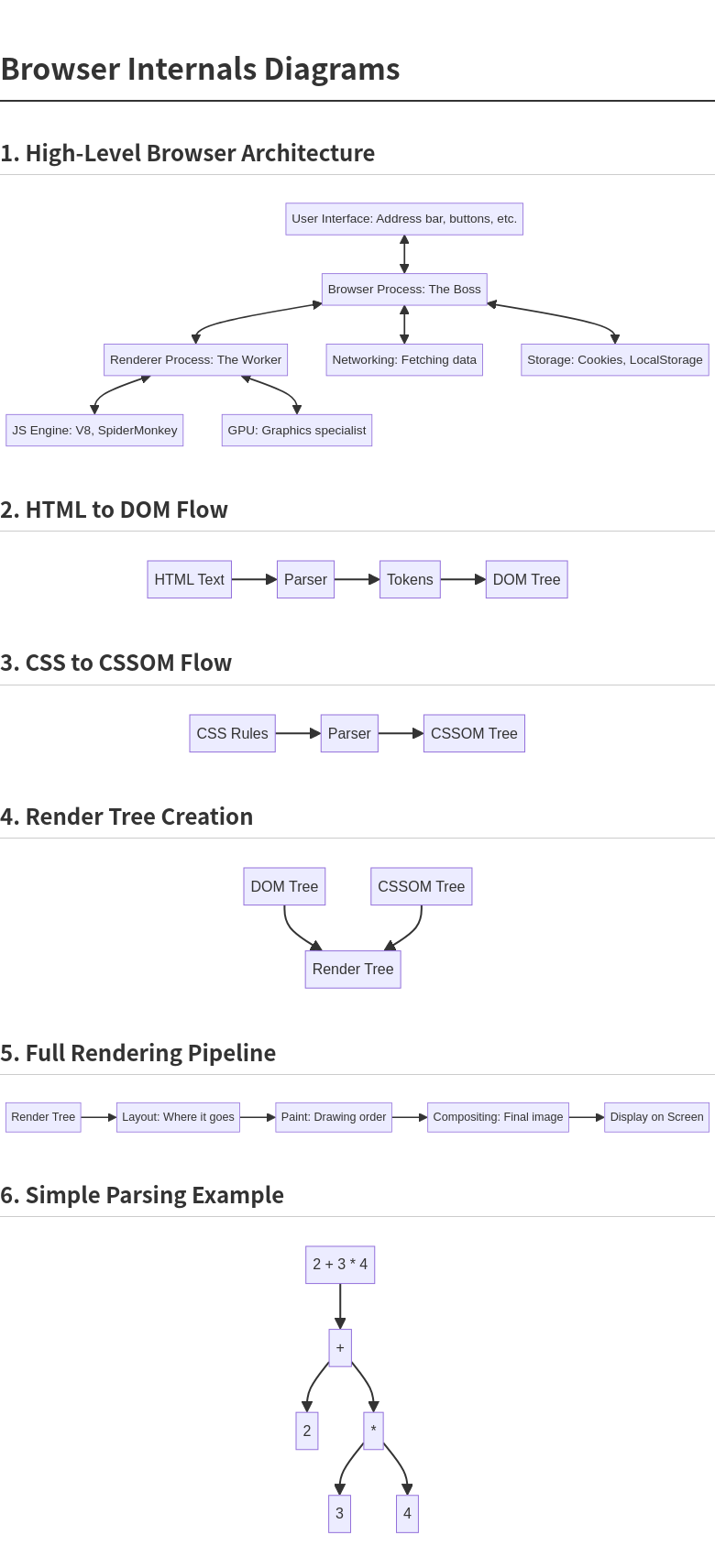
Part 4: A Quick Note on Parsing
The idea of "parsing" sounds technical, but it's just the process of taking a sequence of characters and turning it into a structure that the computer can understand.
Think of it like a teacher breaking down a simple math problem:
Raw Input | Parsing Step | Structured Output |
2 + 3 4 | Tokenization: Breaks the input into pieces: 2, +, 3, , 4. | A list of tokens. |
Tree Construction: Organizes the tokens based on rules. | A simple tree structure. |
The browser does this for everything. It builds these trees so it can understand exactly how your page is structured and styled.
Conclusion: The Flow is What Matters
The next time you load a webpage, take a moment to appreciate the sheer complexity of the process. In a blink, your browser has:
Acted as a Foreman (Browser Engine) to coordinate the job.
Sent a Delivery Truck (Networking) to fetch the materials.
Read the Blueprint (DOM) and the Style Guide (CSSOM).
Combined them into a Render Tree.
Calculated the precise Layout (Reflow) of every element.
Painted the final result to your screen.
It’s a lot to take in, but the key takeaway is the flow: from raw code to structured trees, to geometry, and finally to pixels. You don't need to remember every single term—just know that your browser is a team of specialists working together to bring the internet to your screen. Happy browsing!


